
There is a unique thrill in reconstructing a sprawling family tree—the moment you begin to piece together ancestors and descendants, a chaotic web of history suddenly crystallizes into a clear, elegant structure. IngaBoard is designed to turn this act of discovery into a seamless experience. You don’t need to struggle with manual box placement or tedious line drawing. By simply registering “causal fragments” (parent-to-child relationships) one by one, you witness your lineage evolve into a professional-grade structural tree instantly, revealing the hidden connections between generations as you build them.
case: Greek Mythological Lineage
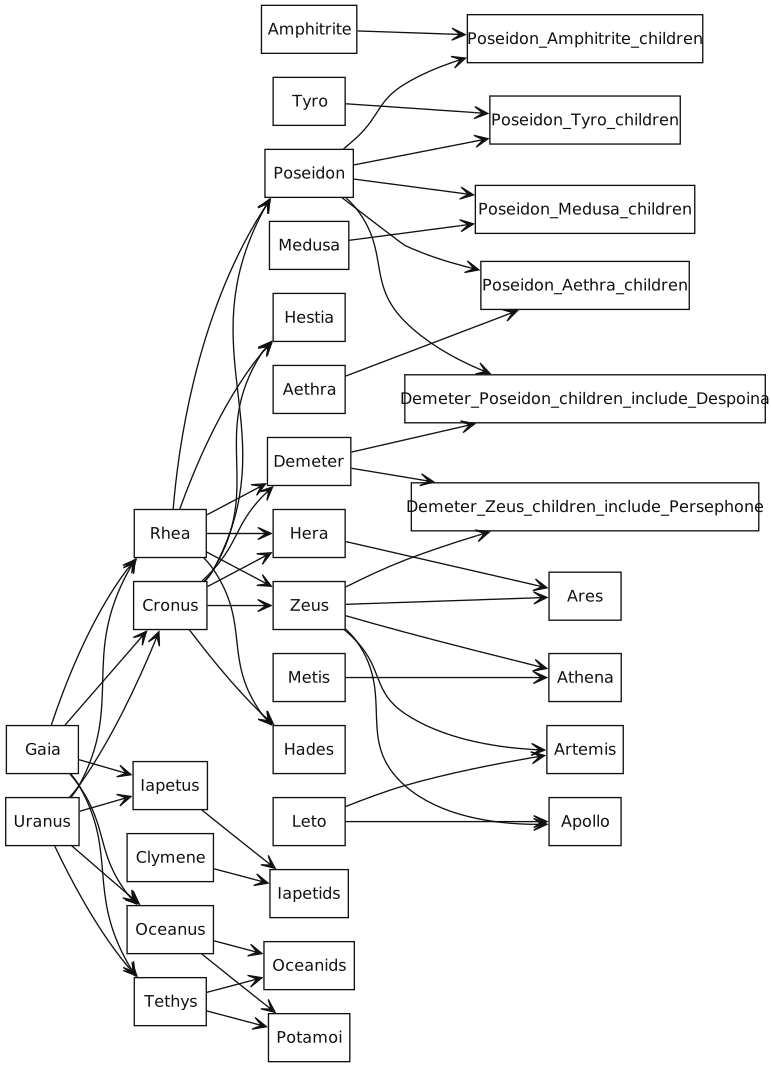
Tracing the lineage of the Olympian gods can feel like an endless, daunting puzzle. With IngaBoard, you treat the family tree as a living system of inheritance. Instead of fighting with a drawing tool, you simply define the relationships in the registration panel:
- Input Fragment:
Uranus→Cronus - Input Fragment:
Gaia→Cronus - Input Fragment:
Cronus→Zeus - Input Fragment:
Rhea→Zeus
As you register these fragments, IngaBoard automatically integrates them into a cohesive, hierarchical tree.
By treating genealogical connections as directed edges, IngaBoard reveals the “causal flow” of a lineage.
Pro Tip: Accelerate with Generative AI
For even faster results, you can use generative AI to draft your initial DOT or Mermaid code. While AI is excellent at generating the foundational structure, be aware that it may occasionally add unnecessary labels, nodes, or edges.
The most effective workflow is an iterative dialogue:
- Drafting: Ask the AI to generate DOT or Mermaid to express the core relationship fragments.
- Refinement: Review the output and instruct the AI to remove extraneous elements or refine the logic.
- Importing: Once the structure is clean, save the DOT or Mermaid code as a file on your computer and import it directly into IngaBoard to instantly render your map.
- Final Refinement & Saving: Use IngaBoard’s interface to perform final adjustments and leverage the “Focus” feature to explore hidden causal paths, deepening your understanding of the relationships. Once you are satisfied, be sure to save your work as an
.ingaboard.jsonfile to preserve your structural map.
By treating the AI as an assistant to handle the heavy lifting, and using IngaBoard to finalize the structural truth, you can map massive lineages with remarkable speed.
#FamilyTree